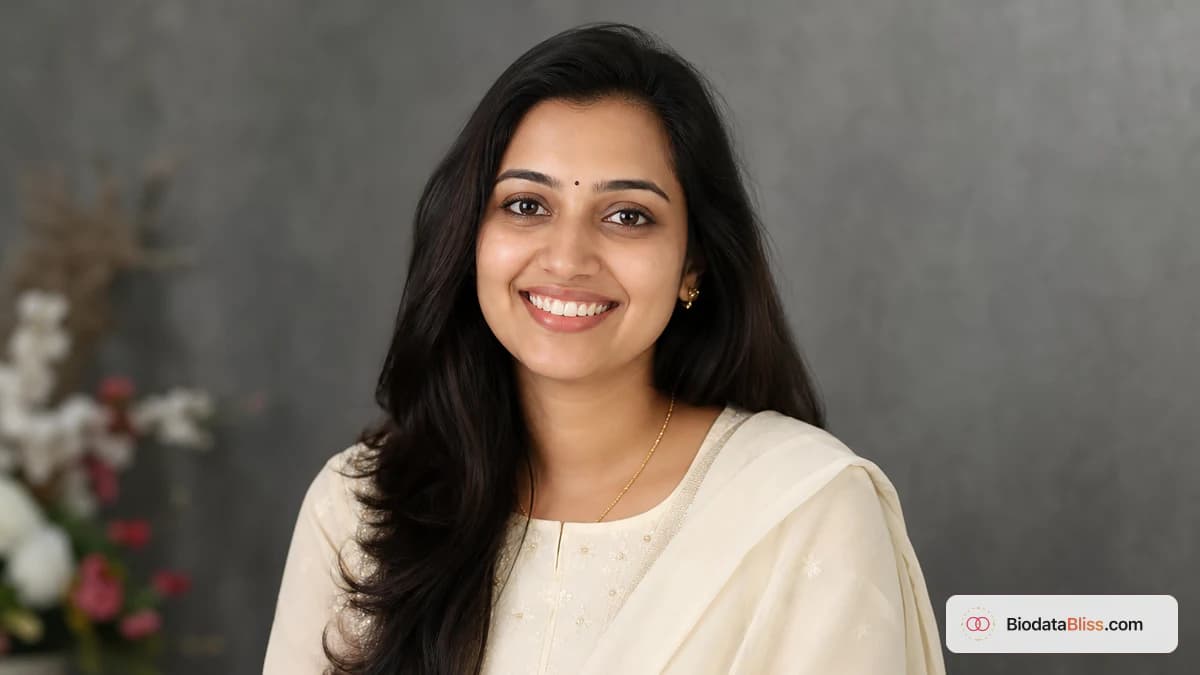
कुटुंबे तुमची पदवी किंवा नोकरीचे शीर्षक वाचण्यापूर्वी, ते तुमचा फोटो पाहतात. स्पष्ट, अलीकडील पोर्ट्रेट सेकंदांमध्ये आत्मविश्वास निर्माण करतो; अस्पष्ट किंवा जास्त संपादित केलेली प्रतिमा चांगल्या संभाषणांना शांतपणे विलंब करते.
जर तुमचा बायोडेटा व्हॉट्सॲपवर शेअर केला जात असेल तर तुमचा फोटो तुमच्या विचारापेक्षा जास्त काम करत आहे. लहान फोन स्क्रीनवर तुमची प्रोफाइल पाहू शकणाऱ्या पालकांसाठी, नातेवाईकांसाठी आणि कुटुंब समन्वयकसाठी हा पहिला ट्रस्ट सिग्नल आहे. चांगली बातमी: तुम्हाला स्टुडिओ शूट किंवा महाग संपादनाची गरज नाही. तुम्हाला फक्त योग्य आकार, प्रकाशयोजना आणि क्रॉपसह अलीकडील, प्रामाणिक पोर्ट्रेटची आवश्यकता आहे. हे मार्गदर्शक कुटुंबांना नेमके काय अपेक्षित आहे हे सांगते: आदर्श परिमाणे, सुरक्षित पोशाख निवडी, स्वच्छ पार्श्वभूमी आणि बायोडेटाब्लिस टेम्पलेट्ससाठी उत्तम प्रकारे कसे क्रॉप करावे. हे एकदा वापरा, आणि तुमचा फोटो डिजिटल शेअरिंग आणि मुद्रित प्रतींमध्ये मजबूत दिसेल.
बहुतेक लोक कबूल करतात त्यापेक्षा तुमचा बायोडेटा फोटो महत्त्वाचा का आहे
व्यवस्थित-विवाह परिचयांमध्ये, वडील सहसा पहिल्या काही सेकंदातच पुढे जायचे की नाही हे ठरवतात. ते नंतर मजकूर स्किम करू शकतात, परंतु ते लगेच तुमचा चेहरा पाहतात.
चांगला बायोडेटा फोटो म्हणजे ग्लॅमरस असा नाही. याचा अर्थ विश्वासार्ह आहे: स्पष्ट डोळे, नैसर्गिक अभिव्यक्ती, आदरणीय पोशाख आणि एक सेटिंग जी तुमच्यापासून विचलित होणार नाही.
- मजकूर होण्यापूर्वी पहिली छाप दृश्यमान असते
- स्वच्छ पोर्ट्रेट गंभीरता आणि प्रामाणिकपणा दर्शवते
- भक्कम क्रेडेन्शियल्स असूनही गोंधळात टाकणारा फोटो संशय निर्माण करतो
- नातेवाईक फोटो त्वरीत फॉरवर्ड करतात, म्हणून स्पष्टता कॉम्प्रेशन टिकली पाहिजे
- तुमच्या व्हिडिओ-कॉल दिसण्याशी सुसंगतता विश्वास निर्माण करते
बायोडेटा PDF साठी सर्वोत्तम फोटो आकार, रिझोल्यूशन आणि स्वरूप
तुम्हाला DSLR गुणवत्तेची गरज नाही, पण तुम्हाला पुरेशा पिक्सेलची गरज आहे जेणेकरून WhatsApp फॉरवर्डिंग आणि PDF जनरेशननंतर तुमचा चेहरा ठळक राहील.
तुमच्या फोन गॅलरीतील उच्च-गुणवत्तेच्या मूळ फोटोसह प्रारंभ करा, स्क्रीनशॉट नाही. आधीच संकुचित प्रतिमांचे स्क्रीनशॉट टेम्पलेट्समध्ये मऊ आणि दाणेदार दिसतात.
- किमान व्यावहारिक स्रोत: सुमारे 800 x 800 पिक्सेल
- शिफारस केलेली अपलोड श्रेणी: 1200 x 1200 ते 2000 x 2000 पिक्सेल
- सामान्य फोटोंसाठी JPG वापरा; जेपीजी गुणवत्ता खराब दिसते तेव्हाच PNG
- चौरस किंवा जवळपास-चौरस स्रोत प्रतिमा बहुतेक टेम्पलेट्समध्ये सर्वोत्तम क्रॉप करतात
- सोप्या संपादनासाठी स्त्रोत फाइलचा आकार वाजवी ठेवा (सामान्यत: 2 MB पेक्षा कमी).
तुमच्याकडे फक्त उभ्या फोटो असल्यास, अंतिम करण्यापूर्वी डोके आणि खांद्यावर क्रॉप करा. मोबाईलवर तुमचा चेहरा लहान दिसत असल्यास, इमेज तयार नाही.
ड्रेस कोड कुटुंबे सहसा चांगला प्रतिसाद देतात
सर्वात सुरक्षित नियम सोपा आहे: पार्टी अल्बम किंवा सुट्टीतील रील नव्हे तर आदरणीय पहिल्या कौटुंबिक बैठकीसाठी जसे कपडे घाला.
पारंपारिक पोशाख आणि स्वच्छ औपचारिक पोशाख दोन्ही चांगले काम करतात. लाऊड प्रिंट्स, चकचकीत लोगो आणि जास्त प्रमाणात कॅज्युअल पोशाख सामान्यतः एकंदर इंप्रेशन कमकुवत करतात.
- महिला: साडी, सलवार-कमीज, कुर्ता किंवा साधे औपचारिक पोशाख
- पुरुष: फॉर्मल शर्ट, कुर्ता किंवा स्वच्छ नेकलाइनसह ब्लेझर
- व्यस्त प्रिंटपेक्षा घन रंग किंवा मऊ पॅटर्नला प्राधान्य द्या
- सनग्लासेस, कॅप्स आणि जड ब्युटी फिल्टर्स टाळा
- तुमच्या दैनंदिन वास्तविक जीवनातील लूक जवळ स्टाइल करत रहा
पार्श्वभूमी आणि प्रकाश नियम जे त्वरित फोटो सुधारतात
बहुतेक बायोडेटा फोटो खराब प्रकाशामुळे अयशस्वी होतात, खराब दिसत नाही. बॅकलिट खिडक्या, पिवळे ट्यूबलाइट आणि गोंधळलेल्या खोल्यांमुळे पोट्रेट अनपॉलिश केलेले दिसतात.
साधी भिंत आणि समोरचा मऊ प्रकाश वापरून तुम्ही घरच्या घरी उत्कृष्ट परिणाम मिळवू शकता.
- साधी भिंत, पडदा वापरा किंवा मऊ अस्पष्ट पार्श्वभूमी स्वच्छ करा
- तुमच्या चेहऱ्यासमोर प्रकाश ठेवा, तुमच्या मागे नाही
- सकाळ/संध्याकाळचा नैसर्गिक खिडकीचा प्रकाश खूप चांगला काम करतो
- डोळ्याच्या सावल्या तयार करणारी कठोर टॉप लाइटिंग टाळा
- फ्रेममध्ये इतर लोक, पाळीव प्राणी किंवा विचलित करणारी वस्तू नाहीत
तुमचा बायोडेटा फोटो योग्य प्रकारे कसा क्रॉप करायचा
क्रॉपिंग म्हणजे जिथे चांगले फोटो देखील चुकतात. तुमचा चेहरा खूपच लहान असल्यास, कुटुंबांना झूम करणे आवश्यक आहे आणि तरीही ते भाव पाहू शकत नाहीत. जर पीक खूप घट्ट असेल तर ते सुशोभित फ्रेममध्ये अस्ताव्यस्त वाटते.
एक संतुलित डोके आणि खांदे पीक सामान्यत: आधुनिक आणि पारंपारिक टेम्पलेटमध्ये सर्वोत्तम कार्य करते.
- क्रॉप फ्रेमच्या वरच्या तिसऱ्या जवळ डोळे ठेवा
- केसांच्या रेषेच्या वर लहान जागा सोडा
- हनुवटी, कान किंवा कपाळाच्या कडा कापणे टाळा
- क्लिनर टेम्पलेट संरेखनासाठी तुमचा चेहरा मध्यभागी ठेवा
- आधुनिक आणि पारंपारिक पूर्वावलोकन शैली दोन्हीमध्ये क्रॉप तपासा
BiodataBliss वर, तुम्ही चेकआउट करण्यापूर्वी तुमचा फॉर्म तपशील न गमावता कधीही पुन्हा क्रॉप करू शकता.
सामान्य फोटो चुका ज्या शांतपणे प्रतिसाद कमी करतात
बहुतेक कमी-प्रतिसाद बायोडेटा मजकूरामुळे नाकारले जात नाहीत. फोटो जुना, अस्पष्ट किंवा खूप एडिट केलेला वाटत असल्यामुळे त्यांच्याकडे दुर्लक्ष केले जाते.
तुमची PDF फॉरवर्ड करण्यापूर्वी या चुका दुरुस्त करणे सोपे आहे.
- जुना फोटो जो यापुढे तुमच्या वर्तमान स्वरूपाशी जुळत नाही
- समूह प्रतिमा अस्ताव्यस्तपणे एका सोलो पोर्ट्रेटमध्ये क्रॉप केली
- जड त्वचा गुळगुळीत किंवा AI-फिल्टर केलेला चेहरा
- दृश्यमान गोंधळासह मिरर सेल्फी
- कमकुवत तपशिलासह कमी-प्रकाश किंवा अस्पष्ट प्रतिमा
- फेस एरियावर मॅट्रिमोनी वॉटरमार्क
पालक आणि भावंडांसाठी द्रुत फोटो सेटअप मार्गदर्शक
कौटुंबिक सदस्य मदत करत असल्यास, 10-मिनिटांचा सेटअप नंतरच्या विचित्र फॉलो-अप स्पष्टीकरणाचे दिवस वाचवू शकतो.
एकाधिक शॉट्स घ्या, नंतर शांत आणि नैसर्गिक दिसणारा एक निवडा, नाट्यमय नाही.
- शूटिंग करण्यापूर्वी फोन लेन्स स्वच्छ करा
- मागील कॅमेरा वापरा, समोरचा सेल्फी कॅमेरा नाही
- लहान अभिव्यक्ती बदलांसह 15-20 शॉट्स घ्या
- अपलोड करण्यापूर्वी एक अंतिम फोटो एकत्र निवडा
- सामान्य व्हाट्सएप झूमवर वाचनीयतेची चाचणी घ्या
चरण-दर-चरण: बायोडेटाब्लिसवर अपलोड आणि पूर्वावलोकन
तुम्ही पूर्ण प्रवाह काही मिनिटांत पूर्ण करू शकता. मुख्य म्हणजे प्रथम प्रोफाइल मजकूर भरणे, नंतर पूर्वावलोकन मोडमध्ये फोटो क्रॉपला अंतिम रूप देणे.
- 1. biodatabliss.com उघडा आणि बायोडेटा तयार करणे सुरू करा
- 2. मूलभूत, कुटुंब आणि संपर्क अचूकपणे भरा
- 3. फोटो स्टेपमध्ये तुमचे अलीकडील सर्वोत्तम पोर्ट्रेट अपलोड करा
- 4. संतुलित डोके आणि खांद्यावर पीक समायोजित करा
- 5. टेम्पलेट्स स्विच करा आणि फोटो फिटची तुलना करा
- 6. आवश्यक असल्यास पुन्हा पीक, नंतर सुरू ठेवा
- 7. PDF डाउनलोड करा आणि फाइल शेअर करा, स्क्रीनशॉट नाही
नातेवाईकांनी तुमचा बायोडेटा फॉरवर्ड करण्यापूर्वी अंतिम प्री-शेअर चेकलिस्ट
प्रथम एका पालक किंवा भावंडाला फक्त फोटोचे पुनरावलोकन करण्यास सांगा. जर ते एका सेकंदासाठीही संकोच करत असतील, तर व्यापकपणे शेअर करण्यापूर्वी त्यात सुधारणा करा.
- फोटो अलीकडील आहे आणि आपल्या वर्तमान स्वरूपाशी जुळतो
- फोन स्क्रीनवर चेहरा तीक्ष्ण राहतो
- पोशाख विनम्र आणि परिचय-अनुकूल आहे
- पार्श्वभूमी स्वच्छ आणि व्यत्ययमुक्त आहे
- टेम्पलेट पूर्वावलोकनामध्ये पीक संतुलित दिसते
- अंतिम सामायिक केलेली फाइल स्वच्छ PDF आहे, वॉटरमार्क केलेले कॅप्चर नाही
अंतिम टीप
एक उत्तम विवाह बायोडेटा फोटो सोपा आहे: अलीकडील, स्पष्ट, आदरणीय आणि छोट्या फोन स्क्रीनवर विश्वास ठेवण्यास सोपे. तुमची लाइटिंग आणि क्रॉप एकदा करा, मोबाइलवर पूर्वावलोकन करा आणि एक PDF शेअर करा जी पहिल्या दृष्टीक्षेपात प्रामाणिक वाटेल.
सुरू करा आत्ताच बायोडाटा तयार करा, नंतर डिझाइन्सची तुलना करा टेम्प्लेट्सचेकआउट करण्यापूर्वी.
तुमचे पोर्ट्रेट जोडण्यासाठी तयार आहात? अपलोड करा, मार्गदर्शित फॉर्ममध्ये क्रॉप करा, तुमच्या टेम्पलेटचे पूर्वावलोकन करा आणि फोनवर फोटो स्पष्ट दिसत असताना डाउनलोड करा.
आत्ताच बायोडाटा तयार कराhttps://biodatabliss.com/mr/create-biodata(नवीन टॅबमध्ये उघडते)