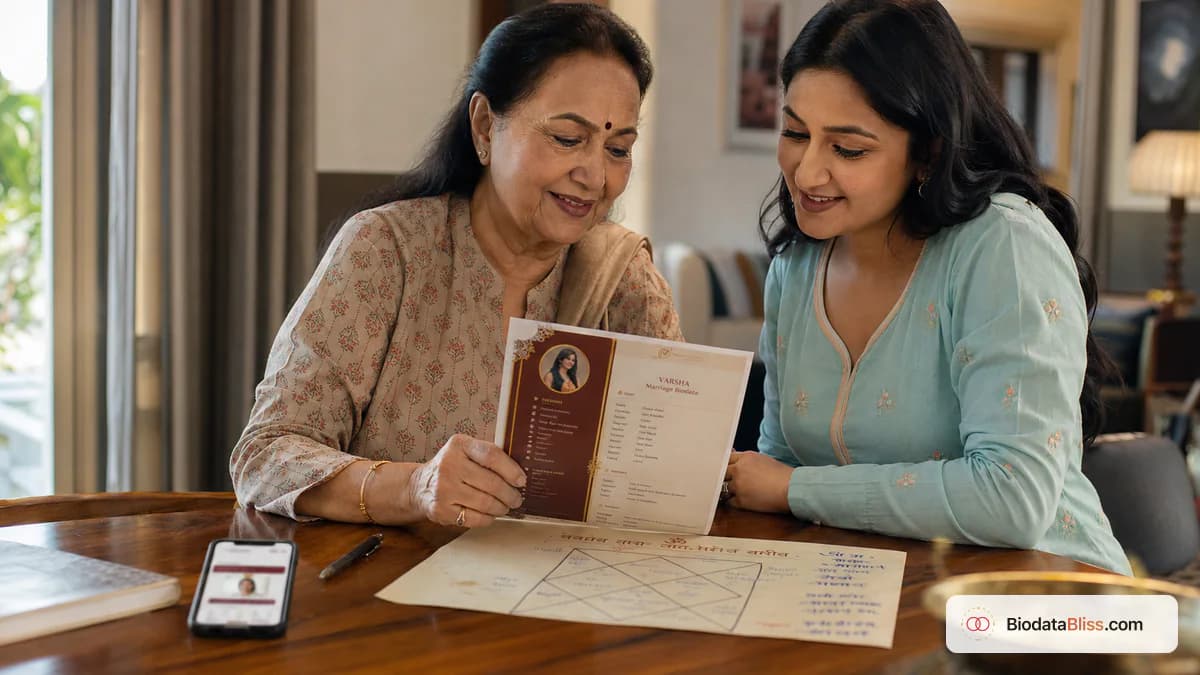
ನಿಮ್ಮ ಕುಟುಂಬದಲ್ಲಿ ಜಾತಕವು ಮುಖ್ಯವಾಗಿದ್ದರೆ, ಅಲಂಕಾರಕ್ಕಿಂತ ನಿಖರತೆ ಮುಖ್ಯವಾಗಿದೆ. ರಾಶಿ ಅಥವಾ ನಕ್ಷತ್ರಕ್ಕಾಗಿ ಒಂದು ಪರಿಶೀಲಿಸಿದ ಸಾಲು ನಂಬಿಕೆಯನ್ನು ನಿರ್ಮಿಸುತ್ತದೆ; ಒಂದು ಊಹಿಸಿದ ಸಾಲು ಅದನ್ನು ಮುರಿಯಬಹುದು.
ಅನೇಕ ವ್ಯವಸ್ಥಿತ ಮದುವೆಯ ಪರಿಚಯಗಳಲ್ಲಿ, ಜಾತಕ ವಿವರಗಳು ಇನ್ನೂ ಮುಖ್ಯವಾಗಿರುತ್ತವೆ ಮತ್ತು ಆಗಾಗ್ಗೆ ಮುಂಚಿತವಾಗಿ ವಿನಂತಿಸಲ್ಪಡುತ್ತವೆ. ಇತರ ಕುಟುಂಬಗಳಲ್ಲಿ, ಆರಂಭಿಕ ಹೊಂದಾಣಿಕೆಯ ನಂತರ ಮಾತ್ರ ಅವುಗಳನ್ನು ಚರ್ಚಿಸಲಾಗುತ್ತದೆ. ಎರಡೂ ವಿಧಾನಗಳು ಮಾನ್ಯವಾಗಿವೆ. ನಿಜವಾದ ತಪ್ಪು ಎಂದರೆ ಗೊಂದಲ: ಅರ್ಧ-ಸರಿಯಾದ ಮೌಲ್ಯಗಳನ್ನು ಸೇರಿಸುವುದು, ಹಳೆಯ ಪ್ರೊಫೈಲ್ಗಳಿಂದ ನಕಲು ಮಾಡುವುದು ಅಥವಾ ಸಂಬಂಧವಿಲ್ಲದ ಬಯೋಡೇಟಾ ವಿಭಾಗಗಳೊಂದಿಗೆ ಜಾತಕ ಕ್ಷೇತ್ರಗಳನ್ನು ಮಿಶ್ರಣ ಮಾಡುವುದು. ಕುಂಡಲಿ ವಿವರಗಳನ್ನು ಯಾವಾಗ ಸೇರಿಸಬೇಕು, ಯಾವ ಕ್ಷೇತ್ರಗಳನ್ನು ಸಾಮಾನ್ಯವಾಗಿ ಬಳಸಲಾಗುತ್ತದೆ, ರಾಶಿ ಮತ್ತು ನಕ್ಷತ್ರವನ್ನು ಸರಿಯಾಗಿ ಪರಿಶೀಲಿಸುವುದು ಹೇಗೆ ಮತ್ತು ನಿಮ್ಮ ಮದುವೆಯ ಬಯೋಡೇಟಾದಲ್ಲಿ ಎಲ್ಲವನ್ನೂ ಸ್ವಚ್ಛವಾಗಿ, ಓದಬಲ್ಲ ರೀತಿಯಲ್ಲಿ ಹೇಗೆ ಪ್ರಸ್ತುತಪಡಿಸಬೇಕು ಎಂಬುದನ್ನು ಈ ಮಾರ್ಗದರ್ಶಿ ವಿವರಿಸುತ್ತದೆ.
ಮದುವೆಯ ಬಯೋಡೇಟಾದಲ್ಲಿ ಜಾತಕ ಸೇರಿದಾಗ
ನಿಮ್ಮ ಕುಟುಂಬ, ಸಮುದಾಯ ಅಥವಾ ಕುಟುಂಬ ಪ್ರಕ್ರಿಯೆಯು ಸಾಮಾನ್ಯವಾಗಿ ಮೊದಲ ಹಂತದ ಹಂಚಿಕೆಯಲ್ಲಿ ನಿರೀಕ್ಷಿಸಿದರೆ ಮಾತ್ರ ಜಾತಕ ಸಾಲುಗಳನ್ನು ಸೇರಿಸಿ. ಆರಂಭಿಕ ಕರೆಯ ನಂತರ ನಿಮ್ಮ ಹಿರಿಯರು ಸಾಮಾನ್ಯವಾಗಿ ಕುಂಡಲಿಯನ್ನು ವಿನಿಮಯ ಮಾಡಿಕೊಂಡರೆ, ನೀವು ಈ ವಿಭಾಗವನ್ನು ಕನಿಷ್ಠವಾಗಿ ಇರಿಸಬಹುದು ಅಥವಾ ಅದನ್ನು ಬಿಟ್ಟುಬಿಡಬಹುದು.
ಕೀಲಿಯು ನಿಮ್ಮ ಕುಟುಂಬದ ವಾಸ್ತವಿಕ ಅಭ್ಯಾಸದೊಂದಿಗೆ ಸ್ಥಿರತೆಯಾಗಿದೆ, ಆನ್ಲೈನ್ನಲ್ಲಿ ಯಾದೃಚ್ಛಿಕ ಟೆಂಪ್ಲೇಟ್ಗಳು ಸೂಚಿಸುವುದಿಲ್ಲ.
- ಚಾರ್ಟ್ ಹೊಂದಾಣಿಕೆಯು ಮೊದಲ ಸ್ಕ್ರೀನಿಂಗ್ನ ಭಾಗವಾಗಿದ್ದರೆ ಸೇರಿಸಿ
- ಕುಟುಂಬ ಸಮನ್ವಯಕ ರಾಶಿ/ನಕ್ಷತ್ರವನ್ನು ಮುಂಗಡವಾಗಿ ಕೇಳಿದರೆ ಸೇರಿಸಿ
- ಆಸಕ್ತಿಯನ್ನು ದೃಢಪಡಿಸಿದ ನಂತರವೇ ನಿಮ್ಮ ಕುಟುಂಬವು ಕುಂಡಲಿಯನ್ನು ಹಂಚಿಕೊಂಡರೆ ಬಿಟ್ಟುಬಿಡಿ
- ವೈಡ್-ಫಾರ್ವರ್ಡ್ PDF ಗಳಲ್ಲಿ ಜನ್ಮ ಸಮಯವನ್ನು ಹಂಚಿಕೊಳ್ಳಲು ನಿಮಗೆ ಅನುಕೂಲಕರವಾಗಿಲ್ಲದಿದ್ದರೆ ಸ್ಕಿಪ್ ಮಾಡಿ
- ಸಮುದಾಯದ ರೂಢಿಗಳನ್ನು ಊಹಿಸುವ ಬದಲು ನೇರವಾಗಿ ಹಿರಿಯರನ್ನು ಕೇಳಿ
ಕೋರ್ ಜಾತಕ ಕ್ಷೇತ್ರಗಳು ಮತ್ತು ವಾಸ್ತವಿಕ ಅರ್ಥಗಳು
ಜ್ಯೋತಿಷ್ಯವನ್ನು ಒಳಗೊಂಡಿರುವ ಹೆಚ್ಚಿನ ಬಯೋಡೇಟಾಗಳು ಜಾಗಗಳ ಕಾಂಪ್ಯಾಕ್ಟ್ ಸೆಟ್ ಅನ್ನು ಬಳಸುತ್ತವೆ. ನಿಮ್ಮ ಮೂಲ ಚಾರ್ಟ್ನಿಂದ ಪ್ರತಿ ಸಾಲನ್ನು ಚಿಕ್ಕದಾಗಿ, ನಿಖರವಾಗಿ ಮತ್ತು ಪರಿಶೀಲಿಸುವಂತೆ ಇರಿಸಿಕೊಳ್ಳಿ.
ವಿಭಿನ್ನ ಪ್ರದೇಶಗಳು ವಿಭಿನ್ನ ಲೇಬಲ್ಗಳನ್ನು ಬಳಸುತ್ತವೆ, ಆದ್ದರಿಂದ ನಿಮ್ಮ ಕುಟುಂಬವು ಈಗಾಗಲೇ ಗುರುತಿಸಿರುವ ಪದಗಳನ್ನು ಬಳಸಿ.
- ರಾಶಿ: ಚಂದ್ರನ ಚಿಹ್ನೆ (ಮೇಷ, ವೃಷಭ ಮುಂತಾದ ಉದಾಹರಣೆ ವಿಭಾಗಗಳು)
- ನಕ್ಷತ್ರ: ಜನ್ಮ ನಕ್ಷತ್ರ, ಚಾರ್ಟ್ ಪ್ರಕಾರ ನಿಖರವಾಗಿ ಉಚ್ಚರಿಸಲಾಗುತ್ತದೆ
- ಗೋತ್ರ/ಗೋತ್ರಮ್: ಸಂಪ್ರದಾಯವು ಅದನ್ನು ಬಳಸುವ ವಂಶದ ಕ್ಷೇತ್ರ
- ಹುಟ್ಟಿದ ಸಮಯ ಮತ್ತು ಸ್ಥಳ: ವಿಶ್ವಾಸದಿಂದ ಪರಿಶೀಲಿಸಿದರೆ ಮಾತ್ರ ಸೇರಿಸಿ
- ಮಂಗಲ್ ದೋಷ / ಮಾಂಗ್ಲಿಕ್ ಸ್ಥಿತಿ: ವಿಶ್ವಾಸಾರ್ಹ ದೃಢೀಕರಣದ ನಂತರ ಮಾತ್ರ ಸೇರಿಸಿ
- ಸಂಬಂಧಿತವಾಗಿರುವ ಐಚ್ಛಿಕ ಕ್ಷೇತ್ರಗಳು: ಗನ್, ನಾಡಿ, ಚರಣ್, ಲಗ್ನಂ
ರಾಶಿ, ನಕ್ಷತ್ರ ಮತ್ತು ಮಂಗಲ ದೋಷವನ್ನು ಸರಿಯಾಗಿ ಪರಿಶೀಲಿಸುವುದು ಹೇಗೆ
ಸತ್ಯದ ಒಂದು ಮೂಲವನ್ನು ಬಳಸಿ: ಅಧಿಕೃತ ಕುಂಡಲಿ, ವಿಶ್ವಾಸಾರ್ಹ ಪಂಡಿತ್ ದಾಖಲೆ ಅಥವಾ ಪರಿಶೀಲಿಸಿದ ಕುಟುಂಬ ದಾಖಲೆ. ಮೆಮೊರಿ, ಸೋದರಸಂಬಂಧಿ ಪ್ರತಿಗಳು ಅಥವಾ ಹಳೆಯ ಫಾರ್ವರ್ಡ್ ಮಾಡಿದ PDF ಗಳನ್ನು ಎಂದಿಗೂ ಅವಲಂಬಿಸಬೇಡಿ.
ಕಟ್ಟುನಿಟ್ಟಾದ ಹೊಂದಾಣಿಕೆಯ ಅಭ್ಯಾಸಗಳನ್ನು ಹೊಂದಿರುವ ಕುಟುಂಬಗಳಿಗೆ, ಸಣ್ಣ ಕಾಗುಣಿತ ಅಥವಾ ಸಮಯದ ದೋಷಗಳು ಕೂಡ ತಕ್ಷಣದ ಅನುಮಾನಕ್ಕೆ ಕಾರಣವಾಗಬಹುದು.
- ಜನ್ಮ ದಿನಾಂಕ ಸ್ವರೂಪದ ಹೊಂದಾಣಿಕೆಗಳ ಚಾರ್ಟ್ ದಾಖಲೆಯನ್ನು ದೃಢೀಕರಿಸಿ
- AM/PM ಸರಿಯಾಗಿರುವುದರೊಂದಿಗೆ ಜನ್ಮ ಸಮಯವನ್ನು ದೃಢೀಕರಿಸಿ
- ವಿದೇಶಿ ಜನನಗಳಿಗಾಗಿ, ಚಾರ್ಟ್ ಮೌಲ್ಯಗಳನ್ನು ಪಡೆಯುವ ಮೊದಲು ಸಮಯ ವಲಯ ನಿರ್ವಹಣೆಯನ್ನು ಪರಿಶೀಲಿಸಿ
- ಹೊಂದಾಣಿಕೆಗಾಗಿ ಬಳಸಲಾದ ರೆಕಾರ್ಡ್ಗೆ ನಿಖರವಾಗಿ ನಕ್ಷತ್ರದ ಕಾಗುಣಿತವನ್ನು ಹೊಂದಿಸಿ
- ಮಂಗಳ ದೋಷದ ಸ್ಥಿತಿಯು ವಿವಾದಾಸ್ಪದವಾಗಿದ್ದರೆ, ಸ್ಪಷ್ಟಪಡಿಸುವವರೆಗೆ ಖಾಲಿ ಬಿಡಿ
ತಪ್ಪಾದ ಡೇಟಾವು ಕಳೆದುಹೋದ ಡೇಟಾಕ್ಕಿಂತ ಕೆಟ್ಟದಾಗಿದೆ. ಅನಿಶ್ಚಿತವಾಗಿದ್ದರೆ, ಕ್ಷೇತ್ರವನ್ನು ಖಾಲಿ ಇರಿಸಿ ಮತ್ತು ನಂತರ ನೇರ ಚರ್ಚೆಯಲ್ಲಿ ಸ್ಪಷ್ಟಪಡಿಸಿ.
ನಂಬಿಕೆಯನ್ನು ತಕ್ಷಣವೇ ಕಡಿಮೆ ಮಾಡುವ ಸಾಮಾನ್ಯ ತಪ್ಪುಗಳು
ಕುಂಡಲಿ ವಿವರಗಳನ್ನು ಪರಿಶೀಲಿಸುವ ಕುಟುಂಬಗಳು ಅಸಂಗತತೆಯನ್ನು ತ್ವರಿತವಾಗಿ ಗಮನಿಸುತ್ತವೆ, ವಿಶೇಷವಾಗಿ ಬಯೋಡೇಟಾದ ಬಹು ಆವೃತ್ತಿಗಳಲ್ಲಿ. ಪುನರಾವರ್ತಿತ ಅಸಾಮರಸ್ಯಗಳು ಶಿಕ್ಷಣ ಮತ್ತು ಕುಟುಂಬವು ಬಲವಾಗಿದ್ದಾಗಲೂ ಉತ್ತಮ ಪ್ರಸ್ತಾಪವನ್ನು ವಿರಾಮಗೊಳಿಸಬಹುದು.
ಹಂಚಿಕೊಳ್ಳುವ ಮೊದಲು ಒಂದು ಎಚ್ಚರಿಕೆಯ ಕ್ರಾಸ್-ಚೆಕ್ ಮೂಲಕ ಹೆಚ್ಚಿನ ದೋಷಗಳನ್ನು ತಡೆಗಟ್ಟಬಹುದು.
- ಮತ್ತೊಂದು ಪ್ರೊಫೈಲ್ನಿಂದ ಜಾತಕ ಸಾಲುಗಳನ್ನು ನಕಲಿಸಲಾಗುತ್ತಿದೆ
- ತಪ್ಪು ಕಾಗುಣಿತದೊಂದಿಗೆ ಸ್ವಯಂ ಸರಿಪಡಿಸಿದ ನಕ್ಷತ್ರದ ಹೆಸರುಗಳನ್ನು ಬಳಸುವುದು
- ಆವೃತ್ತಿಗಳ ನಡುವೆ ಜನ್ಮ ಸಮಯವನ್ನು ಬದಲಾಯಿಸುವುದು
- ದೃಢೀಕರಣವಿಲ್ಲದೆ ಮಾಂಗ್ಲಿಕ್/ಮಾಂಗ್ಲಿಕ್ ಅಲ್ಲದ ಹಕ್ಕು ಪಡೆಯುವುದು
- ಸಂಕ್ಷಿಪ್ತ ಮೌಲ್ಯಗಳ ಬದಲಿಗೆ ಅನಗತ್ಯ ಜ್ಯೋತಿಷ್ಯ ಪ್ರಬಂಧಗಳನ್ನು ಸೇರಿಸುವುದು
ಲೇಔಟ್ನಲ್ಲಿ ಜಾತಕ ವಿವರಗಳನ್ನು ಎಲ್ಲಿ ಇಡಬೇಕು
ಜಾತಕ ವಿವರಗಳನ್ನು ಅವರ ಸ್ವಂತ ಐಚ್ಛಿಕ ಬ್ಲಾಕ್ನಲ್ಲಿ ಇರಿಸಿ. ಶಿಕ್ಷಣ, ವೃತ್ತಿ ಅಥವಾ ಪಾಲುದಾರರ ಆದ್ಯತೆಗಳಲ್ಲಿ ಅವುಗಳನ್ನು ಮಿಶ್ರಣ ಮಾಡಬೇಡಿ. ಪ್ರತ್ಯೇಕತೆಯು ಜ್ಯೋತಿಷ್ಯ-ಕೇಂದ್ರಿತ ಮತ್ತು ಜ್ಯೋತಿಷ್ಯೇತರ ಓದುಗರಿಗೆ ಓದಲು ಬಯೋಡೇಟಾವನ್ನು ಸುಲಭಗೊಳಿಸುತ್ತದೆ.
ಪ್ರೇಕ್ಷಕರನ್ನು ಅವಲಂಬಿಸಿ ನೀವು ಒಂದು ಆವೃತ್ತಿಯನ್ನು ಜಾತಕದೊಂದಿಗೆ ಮತ್ತು ಇನ್ನೊಂದನ್ನು ಇಲ್ಲದೆ ಹಂಚಿಕೊಂಡಾಗ ಇದು ಸಹಾಯ ಮಾಡುತ್ತದೆ.
- "ಜಾತಕ ವಿವರಗಳು" ನಂತಹ ಶೀರ್ಷಿಕೆಯನ್ನು ಬಳಸಿ
- ಎಲ್ಲಾ ಸಂಬಂಧಿತ ಸಾಲುಗಳನ್ನು ಒಟ್ಟಿಗೆ ಗುಂಪು ಮಾಡಿ
- ಪಾಲುದಾರರ ಆದ್ಯತೆಗಳನ್ನು ಪ್ರತ್ಯೇಕ ವಿಭಾಗದಲ್ಲಿ ಇರಿಸಿ
- ಮೊಬೈಲ್ ಓದುವಿಕೆಗಾಗಿ ವಿಭಾಗವನ್ನು ಸಂಕ್ಷಿಪ್ತವಾಗಿ ಇರಿಸಿ
- ವಿನಂತಿಸದ ಹೊರತು ಬಹು-ಪುಟದ ಕುಂಡಲಿಯನ್ನು ಲಗತ್ತಿಸುವುದನ್ನು ತಪ್ಪಿಸಿ
ಬಯೋಡೇಟಾ ವಿರುದ್ಧ ಜಾತಕ ಪ್ರತ್ಯೇಕ ಕುಂಡಲಿ ಡಾಕ್ಯುಮೆಂಟ್
ಮದುವೆಯ ಬಯೋಡೇಟಾ ಸಂಕ್ಷಿಪ್ತವಾಗಿರಬೇಕು. ಬಯೋಡೇಟಾದಲ್ಲಿ ಉನ್ನತ ಮಟ್ಟದ ಜಾತಕ ಗುರುತಿಸುವಿಕೆಗಳನ್ನು ಮಾತ್ರ ಸೇರಿಸಿ ಮತ್ತು ಕುಟುಂಬಗಳು ಕೇಳಿದಾಗ ನಂತರದ ವಿನಿಮಯಕ್ಕಾಗಿ ಪೂರ್ಣ ಕುಂಡಲಿ ದಾಖಲೆಗಳನ್ನು ಇರಿಸಿ.
ಇದು ಗೊಂದಲವನ್ನು ಕಡಿಮೆ ಮಾಡುತ್ತದೆ ಮತ್ತು ಅಗಾಧವಾದ ಮೊದಲ ಬಾರಿ ಓದುಗರನ್ನು ತಪ್ಪಿಸುತ್ತದೆ.
- ಬಯೋಡೇಟಾ ಮಟ್ಟದ ಸಾಲುಗಳು: ರಾಶಿ, ನಕ್ಷತ್ರ, ಗೋತ್ರ, ಮಂಗಳ ರೇಖೆ, ಪರಿಶೀಲಿಸಿದ ಜನ್ಮ ಸಮಯ
- ಪ್ರತ್ಯೇಕ ಕುಂಡಲಿ: ಪೂರ್ಣ ಚಾರ್ಟ್ ಮತ್ತು ಆಳವಾದ ಜ್ಯೋತಿಷ್ಯ ವಿಶ್ಲೇಷಣೆ
- ಊಹಿಸಿದ ಮೌಲ್ಯಗಳನ್ನು ಸಂಪೂರ್ಣವಾಗಿ ಬಿಟ್ಟುಬಿಡಿ
- ಮೊದಲ WhatsApp ಪರಿಚಯಗಳಿಗಾಗಿ ಸಂಕ್ಷಿಪ್ತ ಸ್ವರೂಪವನ್ನು ಬಳಸಿ
- ಸ್ಪಷ್ಟವಾದ ವಿನಂತಿಯ ಮೇರೆಗೆ ಮಾತ್ರ ವಿವರವಾದ ಚಾರ್ಟ್ ಅನ್ನು ಹಂಚಿಕೊಳ್ಳಿ
BiodataBliss ನಲ್ಲಿ ಹಂತ ಹಂತವಾಗಿ
BiodataBliss ಜಾತಕ ಕ್ಷೇತ್ರಗಳನ್ನು ಐಚ್ಛಿಕವಾಗಿರಿಸುತ್ತದೆ ಆದ್ದರಿಂದ ನಿಮ್ಮ ಪ್ರೊಫೈಲ್ ನಿಮ್ಮ ಅಗತ್ಯಗಳಿಗೆ ಅನುಗುಣವಾಗಿ ಸಾಂಪ್ರದಾಯಿಕ ಅಥವಾ ಆಧುನಿಕವಾಗಿರಬಹುದು. ನಿಮ್ಮ ಕುಟುಂಬದ ಅಭ್ಯಾಸಕ್ಕೆ ಅನ್ವಯಿಸುವದನ್ನು ಮಾತ್ರ ಭರ್ತಿ ಮಾಡಿ.
ಟೆಂಪ್ಲೇಟ್ಗಳನ್ನು ಬದಲಾಯಿಸುವುದು ನಮೂದಿಸಿದ ಮೌಲ್ಯಗಳನ್ನು ಅಳಿಸುವುದಿಲ್ಲ, ಆದ್ದರಿಂದ ನೀವು ಸ್ವಚ್ಛ ಮತ್ತು ಸಾಂಪ್ರದಾಯಿಕ ಸ್ವರೂಪಗಳನ್ನು ಸುರಕ್ಷಿತವಾಗಿ ಹೋಲಿಸಬಹುದು.
- 1. biodatabliss.com ತೆರೆಯಿರಿ ಮತ್ತು ಬಯೋಡೇಟಾ ರಚಿಸಿ ಟ್ಯಾಪ್ ಮಾಡಿ
- 2. ಮೊದಲು ಮೂಲಭೂತ ಅಂಶಗಳನ್ನು ಭರ್ತಿ ಮಾಡಿ: ಹೆಸರು, DOB, ಎತ್ತರ
- 3. ರಾಶಿ, ನಕ್ಷತ್ರ, ಗೋತ್ರ, ಜನ್ಮ ಸಮಯಕ್ಕಾಗಿ ಐಚ್ಛಿಕ ವೈಯಕ್ತಿಕ ಕ್ಷೇತ್ರಗಳನ್ನು ತೆರೆಯಿರಿ
- 4. ಪರಿಶೀಲಿಸಿದ ಚಾರ್ಟ್ ಮೌಲ್ಯಗಳನ್ನು ಮಾತ್ರ ಸೇರಿಸಿ
- 5. ಎಂದಿನಂತೆ ಕುಟುಂಬ, ಸಂಪರ್ಕ ಮತ್ತು ಫೋಟೋವನ್ನು ಮುಂದುವರಿಸಿ
- 6. ಬಹು ಟೆಂಪ್ಲೇಟ್ಗಳಲ್ಲಿ ಪೂರ್ವವೀಕ್ಷಣೆ ಮಾಡಿ ಮತ್ತು ಓದುವಿಕೆಯನ್ನು ಪರಿಶೀಲಿಸಿ
- 7. ಕಾಗುಣಿತ ಮತ್ತು DOB-ಸಮಯದ ಸ್ಥಿರತೆಯನ್ನು ಮರುಪರಿಶೀಲಿಸಿ
- 8. ಹಂಚಿಕೊಳ್ಳುವ ಮೊದಲು ಕುಟುಂಬದೊಂದಿಗೆ ಒಮ್ಮೆ ಡೌನ್ಲೋಡ್ ಮಾಡಿ ಮತ್ತು ಪರಿಶೀಲಿಸಿ
ಫಾರ್ವರ್ಡ್ ಮಾಡುವ ಮೊದಲು ಅಂತಿಮ ಪರಿಶೀಲನಾಪಟ್ಟಿ
ನಿಮ್ಮ ಕುಟುಂಬದ ಜಾತಕ ನಿರೀಕ್ಷೆಗಳನ್ನು ಅರ್ಥಮಾಡಿಕೊಳ್ಳುವ ಪೋಷಕರು ಅಥವಾ ಹಿರಿಯರೊಂದಿಗೆ ಒಂದು ಅಂತಿಮ ಓದುವಿಕೆಯನ್ನು ಮಾಡಿ. ಯಾವುದೇ ಸಾಲು ಅನಿಶ್ಚಿತವಾಗಿದ್ದರೆ, ಪರಿಶೀಲಿಸುವವರೆಗೆ ಅದನ್ನು ತೆಗೆದುಹಾಕಿ.
ಅತ್ಯಂತ ಪರಿಣಾಮಕಾರಿ ಬಯೋಡೇಟಾ ನಿಖರವಾಗಿದೆ, ಓವರ್ಲೋಡ್ ಆಗಿಲ್ಲ.
- ರಾಶಿಯನ್ನು ನಿಜವಾದ ಚಾರ್ಟ್ನಿಂದ ಪರಿಶೀಲಿಸಲಾಗಿದೆ
- ನಕ್ಷತ್ರದ ಕಾಗುಣಿತವನ್ನು ಎಚ್ಚರಿಕೆಯಿಂದ ಪರಿಶೀಲಿಸಲಾಗಿದೆ
- ನಿಮ್ಮ ಸಂಪ್ರದಾಯವು ಅದನ್ನು ಬಳಸಿದರೆ ಮಾತ್ರ ಗೋತ್ರವನ್ನು ಸೇರಿಸಲಾಗುತ್ತದೆ
- ಸೇರಿಸುವ ಮೊದಲು ಮಂಗಲ್ ದೋಷ್ ಲೈನ್ ಅನ್ನು ದೃಢಪಡಿಸಲಾಗಿದೆ
- ಹುಟ್ಟಿದ ಸಮಯ AM/PM ಮತ್ತು ಸ್ಥಳವನ್ನು ಮೌಲ್ಯೀಕರಿಸಲಾಗಿದೆ
- ಪಾಲುದಾರರ ಆದ್ಯತೆಗಳಿಂದ ಜಾತಕ ವಿಭಾಗವನ್ನು ಪ್ರತ್ಯೇಕಿಸಲಾಗಿದೆ
- ಹಂಚಿಕೊಳ್ಳುವ ಮೊದಲು ಅಂತಿಮ PDF ಅನ್ನು ಮೊಬೈಲ್ನಲ್ಲಿ ಪರಿಶೀಲಿಸಲಾಗಿದೆ
ಅಂತಿಮ ಸಲಹೆ
ನಿಮ್ಮ ಕುಟುಂಬವು ಅವುಗಳನ್ನು ನಿಜವಾಗಿ ಬಳಸಿದಾಗ ಮಾತ್ರ ಜಾತಕ ವಿವರಗಳನ್ನು ಸೇರಿಸಿ ಮತ್ತು ನೀವು ಪರಿಶೀಲಿಸಬಹುದಾದುದನ್ನು ಮಾತ್ರ ಸೇರಿಸಿ. BiodataBliss ನಲ್ಲಿ ನಿಮ್ಮ ಮದುವೆಯ ಬಯೋಡೇಟಾವನ್ನು ನಿರ್ಮಿಸಿ, ರಾಶಿ ಮತ್ತು ನಕ್ಷತ್ರ ರೇಖೆಗಳನ್ನು ಸ್ವಚ್ಛವಾಗಿ ಮತ್ತು ನಿಖರವಾಗಿ ಇರಿಸಿ ಮತ್ತು ಅಂತಿಮ ಕುಟುಂಬ ಪರಿಶೀಲನೆಯ ನಂತರ ಮಾತ್ರ ಹಂಚಿಕೊಳ್ಳಿ.
ಪ್ರಾರಂಭಿಸಿ ಈಗ ಬಯೋಡಾಟಾ ರಚಿಸಿ, ನಂತರ ವಿನ್ಯಾಸಗಳನ್ನು ಹೋಲಿಕೆ ಮಾಡಿ ಟೆಂಪ್ಲೇಟ್ಚೆಕ್ಔಟ್ ಮೊದಲು.
ಕುಂಡಲಿ ವಿವರಗಳನ್ನು ಸೇರಿಸಲು ಸಿದ್ಧರಿದ್ದೀರಾ? ಐಚ್ಛಿಕ ಜಾತಕ ಕ್ಷೇತ್ರಗಳನ್ನು ಭರ್ತಿ ಮಾಡಿ, ಎಚ್ಚರಿಕೆಯಿಂದ ಪೂರ್ವವೀಕ್ಷಣೆ ಮಾಡಿ ಮತ್ತು ಪ್ರತಿ ಸಾಲನ್ನು ಪರಿಶೀಲಿಸಿದಾಗ ಡೌನ್ಲೋಡ್ ಮಾಡಿ.
ಈಗ ಬಯೋಡಾಟಾ ರಚಿಸಿhttps://biodatabliss.com/kn/create-biodata(ಹೊಸ ಟ್ಯಾಬ್ನಲ್ಲಿ ತೆರೆಯುತ್ತದೆ)