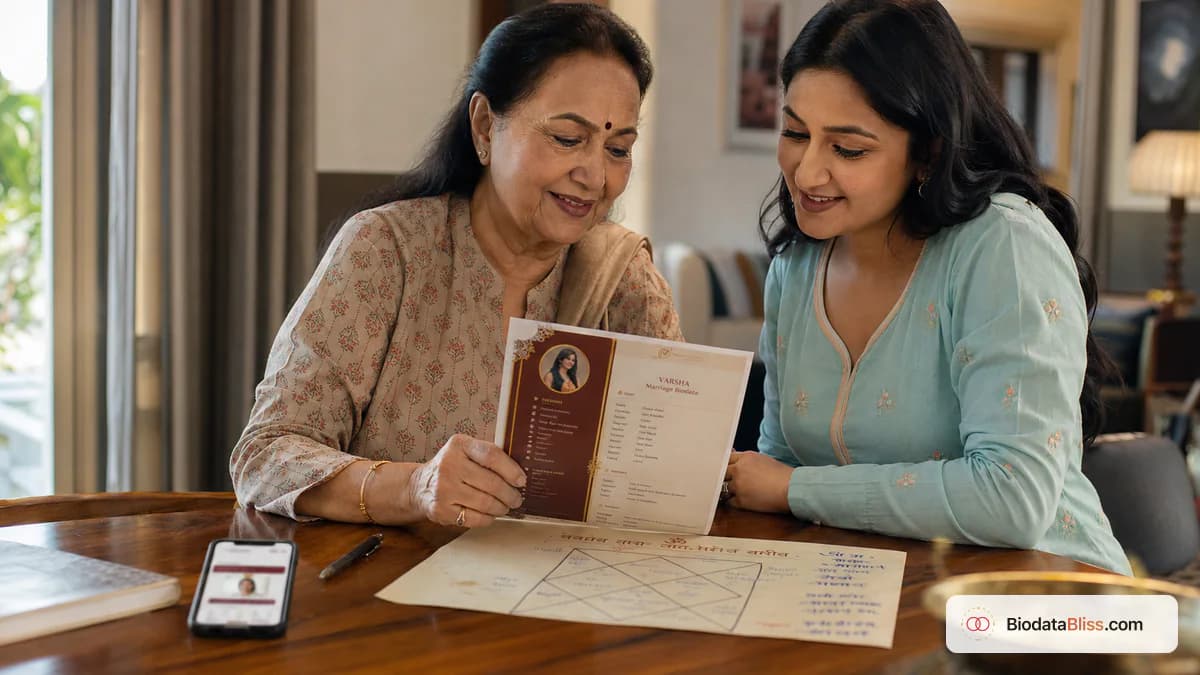
మీ కుటుంబంలో జాతకం ముఖ్యమైతే, అలంకరణ కంటే ఖచ్చితత్వం ముఖ్యం. రాశి లేదా నక్షత్రం కోసం ధృవీకరించబడిన ఒక లైన్ నమ్మకాన్ని పెంచుతుంది; ఒక ఊహించిన పంక్తి దానిని విచ్ఛిన్నం చేయగలదు.
అనేక ఏర్పాటు చేసిన వివాహ పరిచయాలలో, జాతక వివరాలు ఇప్పటికీ ముఖ్యమైనవి మరియు తరచుగా ముందుగానే అభ్యర్థించబడతాయి. ఇతర కుటుంబాలలో, వారు ప్రాథమిక అనుకూలత తర్వాత మాత్రమే చర్చించబడతారు. రెండు విధానాలు చెల్లుబాటు అయ్యేవి. అసలైన తప్పు గందరగోళం: సగం సరైన విలువలను జోడించడం, పాత ప్రొఫైల్ల నుండి కాపీ చేయడం లేదా సంబంధం లేని బయోడేటా విభాగాలతో జాతక క్షేత్రాలను కలపడం. ఈ గైడ్ ఖచ్చితంగా కుండలి వివరాలను ఎప్పుడు చేర్చాలో వివరిస్తుంది, సాధారణంగా ఉపయోగించే ఫీల్డ్లు, రాశి మరియు నక్షత్రాలను సరిగ్గా ఎలా ధృవీకరించాలి మరియు మీ వివాహ బయోడేటాలో ప్రతిదీ శుభ్రంగా, చదవగలిగే విధంగా ఎలా ప్రదర్శించాలి.
వివాహ బయోడేటాలో జాతకం ఉన్నప్పుడు
మీ కుటుంబం, సంఘం లేదా కుటుంబ ప్రక్రియ సాధారణంగా మొదటి దశ షేరింగ్లో ఆశించినట్లయితే మాత్రమే జాతక పంక్తులను చేర్చండి. ప్రారంభ కాల్ తర్వాత మీ పెద్దలు సాధారణంగా కుండలిని మార్పిడి చేస్తే, మీరు ఈ విభాగాన్ని కనిష్టంగా ఉంచవచ్చు లేదా వదిలివేయవచ్చు.
ఆన్లైన్లో యాదృచ్ఛిక టెంప్లేట్లు సూచించేవి కాకుండా మీ కుటుంబం యొక్క వాస్తవ అభ్యాసానికి అనుగుణంగా ఉండటం ప్రధానం.
- చార్ట్ మ్యాచింగ్ మొదటి స్క్రీనింగ్లో భాగమైతే చేర్చండి
- కుటుంబ సమన్వయకర్త రాశి/నక్షత్రం కోసం ముందుగా అడిగితే చేర్చండి
- ఆసక్తి నిర్ధారించబడిన తర్వాత మాత్రమే మీ కుటుంబం కుండలిని పంచుకుంటే దాటవేయండి
- వైడ్-ఫార్వర్డ్ PDFలలో పుట్టిన సమయాన్ని భాగస్వామ్యం చేయడం మీకు సౌకర్యంగా లేకుంటే దాటవేయండి
- సంఘం నిబంధనలను ఊహించే బదులు నేరుగా పెద్దలను అడగండి
కోర్ జాతక క్షేత్రాలు మరియు వాస్తవ అర్థాలు
జ్యోతిషశాస్త్రాన్ని కలిగి ఉన్న చాలా బయోడేటాలు కాంపాక్ట్ ఫీల్డ్ సెట్ను ఉపయోగిస్తాయి. మీ సోర్స్ చార్ట్ నుండి ప్రతి పంక్తిని చిన్నగా, ఖచ్చితమైనదిగా మరియు ధృవీకరించదగినదిగా ఉంచండి.
వేర్వేరు ప్రాంతాలు వేర్వేరు లేబుల్లను ఉపయోగిస్తాయి, కాబట్టి మీ కుటుంబం ఇప్పటికే గుర్తించిన నిబంధనలను ఉపయోగించండి.
- రాశి: చంద్ర రాశి (మేష, వృషభ మొదలైన ఉదాహరణ వర్గాలు)
- నక్షత్రం: జన్మ నక్షత్రం, చార్ట్ ప్రకారం సరిగ్గా వ్రాయబడింది
- గోత్రం/గోత్రం: సంప్రదాయాన్ని ఉపయోగించే వంశ క్షేత్రం
- పుట్టిన సమయం మరియు ప్రదేశం: నమ్మకంగా ధృవీకరించబడినట్లయితే మాత్రమే చేర్చండి
- మంగళ్ దోష్ / మాంగ్లిక్ స్థితి: విశ్వసనీయ నిర్ధారణ తర్వాత మాత్రమే చేర్చండి
- సంబంధితమైన ఐచ్ఛిక ఫీల్డ్లు: గన్, నాడి, చరణ్, లగ్నం
రాశి, నక్షత్రం మరియు మంగళ దోషాలను ఎలా సరిగ్గా ధృవీకరించాలి
సత్యం యొక్క ఒక మూలాన్ని ఉపయోగించండి: అధికారిక కుండలి, విశ్వసనీయ పండిట్ రికార్డ్ లేదా ధృవీకరించబడిన కుటుంబ పత్రం. మెమరీ, కజిన్ కాపీలు లేదా పాత ఫార్వార్డ్ చేసిన PDFలపై ఎప్పుడూ ఆధారపడకండి.
ఖచ్చితమైన మ్యాచింగ్ పద్ధతులు ఉన్న కుటుంబాలకు, చిన్న స్పెల్లింగ్ లేదా టైమింగ్ లోపాలు కూడా తక్షణ సందేహానికి దారితీస్తాయి.
- పుట్టిన తేదీ ఫార్మాట్ చార్ట్ రికార్డ్తో సరిపోలుతుందో నిర్ధారించండి
- AM/PM ఖచ్చితత్వంతో పుట్టిన సమయాన్ని నిర్ధారించండి
- విదేశీ జననాల కోసం, చార్ట్ విలువలను పొందే ముందు టైమ్ జోన్ నిర్వహణను ధృవీకరించండి
- సరిపోలిక కోసం ఉపయోగించిన రికార్డ్కు సరిగ్గా నక్షత్ర స్పెల్లింగ్ను సరిపోల్చండి
- మంగళ్ దోష్ స్థితి వివాదాస్పదమైతే, స్పష్టత వచ్చే వరకు ఖాళీగా ఉంచండి
తప్పు డేటా మిస్సింగ్ డేటా కంటే అధ్వాన్నంగా ఉంది. అనిశ్చితంగా ఉంటే, ఫీల్డ్ను ఖాళీగా ఉంచి, తర్వాత ప్రత్యక్ష చర్చలో స్పష్టం చేయండి.
నమ్మకాన్ని తక్షణమే తగ్గించే సాధారణ తప్పులు
కుండలి వివరాలను తనిఖీ చేసే కుటుంబాలు అసమానతలను త్వరగా గమనిస్తాయి, ముఖ్యంగా బయోడేటా యొక్క బహుళ వెర్షన్లలో. పదేపదే అసమతుల్యతలు విద్య మరియు కుటుంబ సవ్యంగా ఉన్నప్పుడు కూడా మంచి ప్రతిపాదనను పాజ్ చేయగలవు.
భాగస్వామ్యానికి ముందు ఒక జాగ్రత్తగా క్రాస్ చెక్ చేయడం ద్వారా చాలా లోపాలు నివారించబడతాయి.
- మరొక ప్రొఫైల్ నుండి జాతక పంక్తులను కాపీ చేస్తోంది
- తప్పు స్పెల్లింగ్తో స్వయంచాలకంగా సరిదిద్దబడిన నక్షత్రాల పేర్లను ఉపయోగించడం
- సంస్కరణల మధ్య పుట్టిన సమయాన్ని మార్చడం
- నిర్ధారణ లేకుండా మాంగ్లిక్/నాన్-మాంగ్లిక్ క్లెయిమ్ చేయడం
- సంక్షిప్త విలువలకు బదులుగా అనవసరమైన జ్యోతిష్య వ్యాసాలను జోడించడం
లేఅవుట్లో జాతక వివరాలను ఎక్కడ ఉంచాలి
జాతక వివరాలను వారి స్వంత ఐచ్ఛిక బ్లాక్లో ఉంచండి. విద్య, వృత్తి లేదా భాగస్వామి ప్రాధాన్యతలలో వాటిని కలపవద్దు. వేరు చేయడం వలన జ్యోతిష్యం-కేంద్రీకృత మరియు జ్యోతిష్యం కాని పాఠకుల కోసం బయోడేటా సులభంగా చదవబడుతుంది.
ప్రేక్షకులను బట్టి మీరు ఒక వెర్షన్ను జాతకంతో మరియు మరొక వెర్షన్ లేకుండా షేర్ చేసినప్పుడు కూడా ఇది సహాయపడుతుంది.
- "జాతక వివరాలు" వంటి శీర్షికను ఉపయోగించండి
- అన్ని సంబంధిత పంక్తులను సమూహపరచండి
- భాగస్వామి ప్రాధాన్యతలను ప్రత్యేక విభాగంలో ఉంచండి
- మొబైల్ రీడబిలిటీ కోసం విభాగాన్ని సంక్షిప్తంగా ఉంచండి
- అభ్యర్థించకపోతే బహుళ పేజీల కుండలిని జోడించడం మానుకోండి
బయోడేటాపై జాతకం vs ప్రత్యేక కుండలి పత్రం
వివాహ బయోడేటా సంక్షిప్తంగా ఉండాలి. బయోడేటాలో ఉన్నత-స్థాయి జాతక గుర్తింపుదారులను మాత్రమే చేర్చండి మరియు కుటుంబాలు అడిగినప్పుడు తదుపరి మార్పిడి కోసం పూర్తి కుండలి పత్రాలను ఉంచండి.
ఇది అయోమయాన్ని తగ్గిస్తుంది మరియు మొదటిసారి చదివేవారిని అధిక సంఖ్యలో నివారిస్తుంది.
- బయోడేటా-స్థాయి లైన్లు: రాశి, నక్షత్రం, గోత్రం, మంగళరేఖ, ధృవీకరించబడిన పుట్టిన సమయం
- ప్రత్యేక కుండలి: పూర్తి చార్ట్ మరియు లోతైన జ్యోతిష్య విశ్లేషణ
- ఊహించిన విలువలను పూర్తిగా దాటవేయండి
- మొదటి WhatsApp పరిచయాల కోసం సంక్షిప్త ఆకృతిని ఉపయోగించండి
- స్పష్టమైన అభ్యర్థనపై మాత్రమే వివరణాత్మక చార్ట్ను భాగస్వామ్యం చేయండి
BiodataBlissపై దశలవారీగా
BiodataBliss జాతక క్షేత్రాలను ఐచ్ఛికంగా ఉంచుతుంది కాబట్టి మీ ప్రొఫైల్ మీ అవసరాలను బట్టి సంప్రదాయంగా లేదా ఆధునికంగా ఉంటుంది. మీ కుటుంబ అభ్యాసానికి వర్తించే వాటిని మాత్రమే పూరించండి.
టెంప్లేట్లను మార్చడం వలన నమోదు చేయబడిన విలువలు చెరిపివేయబడవు, కాబట్టి మీరు క్లీన్ మరియు సాంప్రదాయ ఫార్మాట్లను సురక్షితంగా సరిపోల్చవచ్చు.
- 1. biodatabliss.comని తెరిచి, బయోడేటా సృష్టించు నొక్కండి
- 2. ముందుగా ప్రాథమికాలను పూరించండి: పేరు, DOB, ఎత్తు
- 3. రాశి, నక్షత్రం, గోత్రం, పుట్టిన సమయం కోసం ఐచ్ఛిక వ్యక్తిగత ఫీల్డ్లను తెరవండి
- 4. ధృవీకరించబడిన చార్ట్ విలువలను మాత్రమే జోడించండి
- 5. కుటుంబం, పరిచయం మరియు ఫోటోను యధావిధిగా కొనసాగించండి
- 6. బహుళ టెంప్లేట్లలో ప్రివ్యూ చేయండి మరియు రీడబిలిటీని తనిఖీ చేయండి
- 7. స్పెల్లింగ్ మరియు DOB-సమయ అనుగుణ్యతను మళ్లీ తనిఖీ చేయండి
- 8. భాగస్వామ్యం చేయడానికి ముందు కుటుంబంతో ఒకసారి డౌన్లోడ్ చేసి, సమీక్షించండి
ఫార్వార్డ్ చేయడానికి ముందు చివరి చెక్లిస్ట్
మీ కుటుంబం యొక్క జాతక అంచనాలను అర్థం చేసుకున్న తల్లిదండ్రులు లేదా పెద్దలతో చివరిగా చదవండి. ఏదైనా లైన్ అనిశ్చితంగా అనిపిస్తే, ధృవీకరించబడే వరకు దాన్ని తీసివేయండి.
అత్యంత ప్రభావవంతమైన బయోడేటా ఖచ్చితమైనది, ఓవర్లోడ్ కాదు.
- రాశి వాస్తవ చార్ట్ నుండి ధృవీకరించబడింది
- నక్షత్ర స్పెల్లింగ్ జాగ్రత్తగా తనిఖీ చేయబడింది
- మీ సంప్రదాయం దానిని ఉపయోగిస్తే మాత్రమే గోత్రం చేర్చబడుతుంది
- చేర్చడానికి ముందు మంగళ్ దోష్ లైన్ నిర్ధారించబడింది
- పుట్టిన సమయం AM/PM మరియు స్థలం ధృవీకరించబడింది
- భాగస్వామి ప్రాధాన్యతల నుండి జాతక విభాగం వేరు చేయబడింది
- భాగస్వామ్యం చేయడానికి ముందు చివరి PDF మొబైల్లో తనిఖీ చేయబడింది
చివరి చిట్కా
మీ కుటుంబం వాటిని నిజంగా ఉపయోగించినప్పుడు మాత్రమే జాతక వివరాలను జోడించండి మరియు మీరు ధృవీకరించగలిగే వాటిని మాత్రమే జోడించండి. BiodataBlissలో మీ వివాహ బయోడేటాను రూపొందించండి, రాశి మరియు నక్షత్ర రేఖలను శుభ్రంగా మరియు ఖచ్చితమైనదిగా ఉంచండి మరియు తుది కుటుంబ తనిఖీ తర్వాత మాత్రమే భాగస్వామ్యం చేయండి.
ప్రారంభించండి ఇప్పుడే బయోడేటాని సృష్టించండి, ఆపై డిజైన్లను సరిపోల్చండి టెంప్లేట్చెక్అవుట్ ముందు.
కుండలి వివరాలను జోడించడానికి సిద్ధంగా ఉన్నారా? ఐచ్ఛిక జాతక క్షేత్రాలను పూరించండి, జాగ్రత్తగా ప్రివ్యూ చేయండి మరియు ప్రతి లైన్ ధృవీకరించబడినప్పుడు డౌన్లోడ్ చేయండి.
ఇప్పుడే బయోడేటాని సృష్టించండిhttps://biodatabliss.com/te/create-biodata(కొత్త ట్యాబ్లో తెరవబడుతుంది)